
Design/UX more. Click less.
Boost your productivity, reduce clicks and eliminate repetitive work that saves your hundreds of hours. Create a entire variable color or typography system in seconds, done. Figma plugins designed by designers, for designers and UX teams.
Plugins built to speed up workflwo for designers and UX teams.
Our family of powerful Figma Plugins
Coomprehensive plugins for an entire workflow. Built for web design Design, UX and quickly exporting your pages and frames.
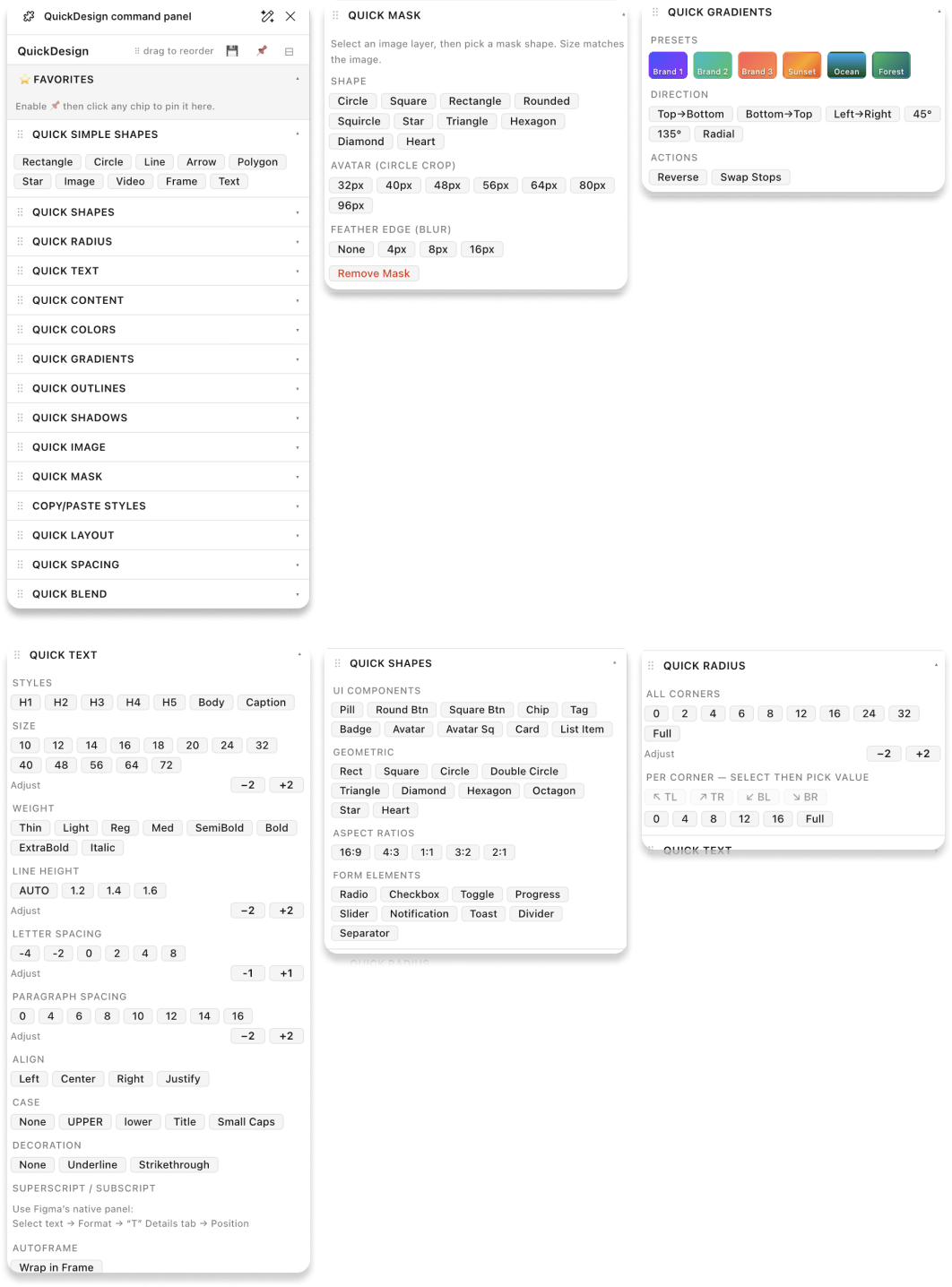
FigBoost QuickDesign Command Panel
A full design application for building complete websites inside Figma. Drop in sections, swap content, apply your brand — and have a web design in the time it would normally take to just set up your file.
Stats:
- ⭐ Favorites — Pin any command chip to the top of the panel for instant access to your most-used tools
- Drag to reorder — Rearrange every module section to match your personal workflow
- Save layout — Persist your panel order and pinned favorites across sessions
- Quick Simple Shapes — One-click insert for Rectangle, Circle, Line, Arrow, Polygon, Star, Image, Video, Frame, and Text nodes
- Quick Shapes — Extended shape creation with additional style and size controls
- Quick Radius — Apply corner radius values to selected layers instantly
- Quick Text — Set font, size, weight, and alignment in a single panel
- Quick Content — Populate layers with placeholder content fast
- Quick Colors — Apply fill colors to selected layers without opening the color picker
- Quick Gradients — Add and adjust gradient fills with a single click
- Quick Outlines — Apply stroke/outline styles and weights to any selection
- Quick Shadows — Add drop shadows with preset or custom values
- Quick Image — Place and swap image fills on selected frames
- Quick Mask — Apply and manage masks on selected layers
- Copy/Paste Styles — Copy fill, stroke, effects, and text styles from one layer and paste to any other
- Quick Layout — Set auto-layout direction, spacing, padding, and alignment rapidly
- Quick Spacing — Adjust spacing between layers or within auto-layout containers
- Quick Blend — Change blend mode on selected layers from a dropdown
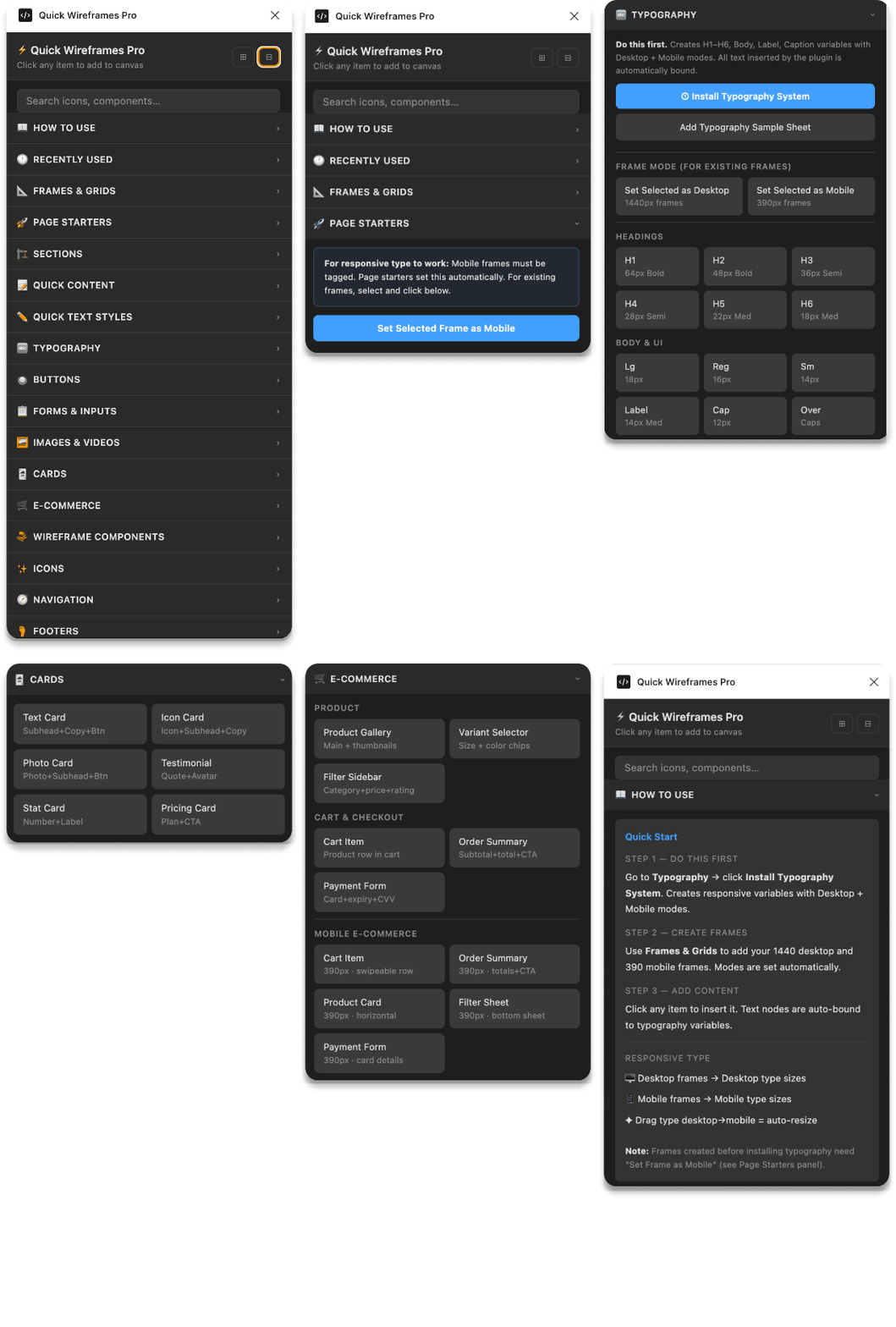
FigBoost Wireframe / UX Toolkit
A complete wireframing environment with everything you need to take a project from blank canvas to a complete web site for both desktop and mobile. No setup, no hunting for components — just open it and start building.
Stats:
- 300+ wireframe components
- 80+ UX patterns — navigation, forms, modals, cards, tables, media players, data displays
- 40+ page templates — dashboard, login, onboarding, settings, profile, feed, checkout
- 15+ complete app templates ready to customize
- 3 breakpoints — mobile, tablet, desktop, all included
- 10+ categories — Navigation, Auth, Data, Modals, Cards, Forms, Tables, Alerts, Media, Empty States
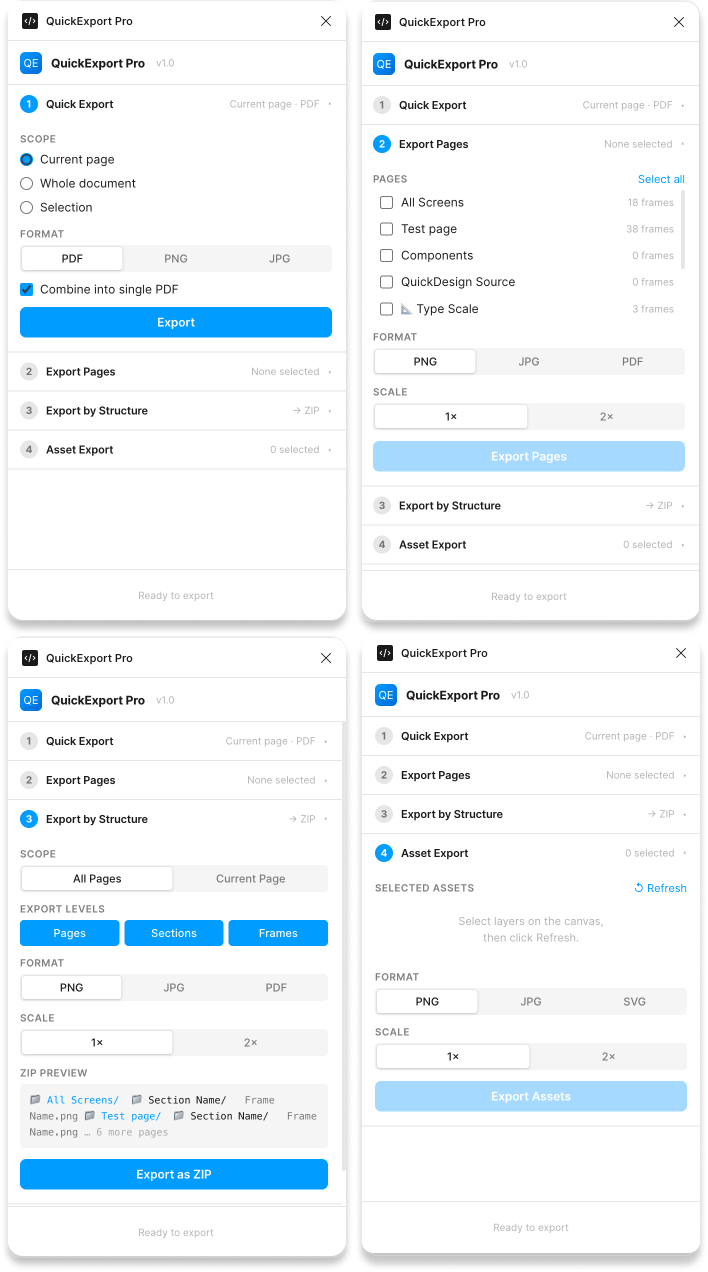
FigBoost QuickExport Pro
Full Export Suite Every format, every asset, one click.
Export any selection — or your entire file — to multiple formats, resolutions, and platforms in a single run. What used to take twenty minutes of manual slicing now takes seconds.
Stats:
- 7 export formats — PNG, JPG, SVG, PDF
- Export pages directly to pdf without Acrobat!!! Saves hours of time every week.
- Batch export entire files or any selection in a single run
- Custom scales — 1×, 1.5×, 2×, 3×, 4×, or any custom multiplier
- Preset system — save and reuse export configurations per project
- Smart naming — tokens, slashes, prefixes, and auto-folder organization
- Developer handoff — clean asset names, organized folders, ready to drop into any codebase
FigBoost Quick Animated Gif Pro
Animate anything. Export in seconds.
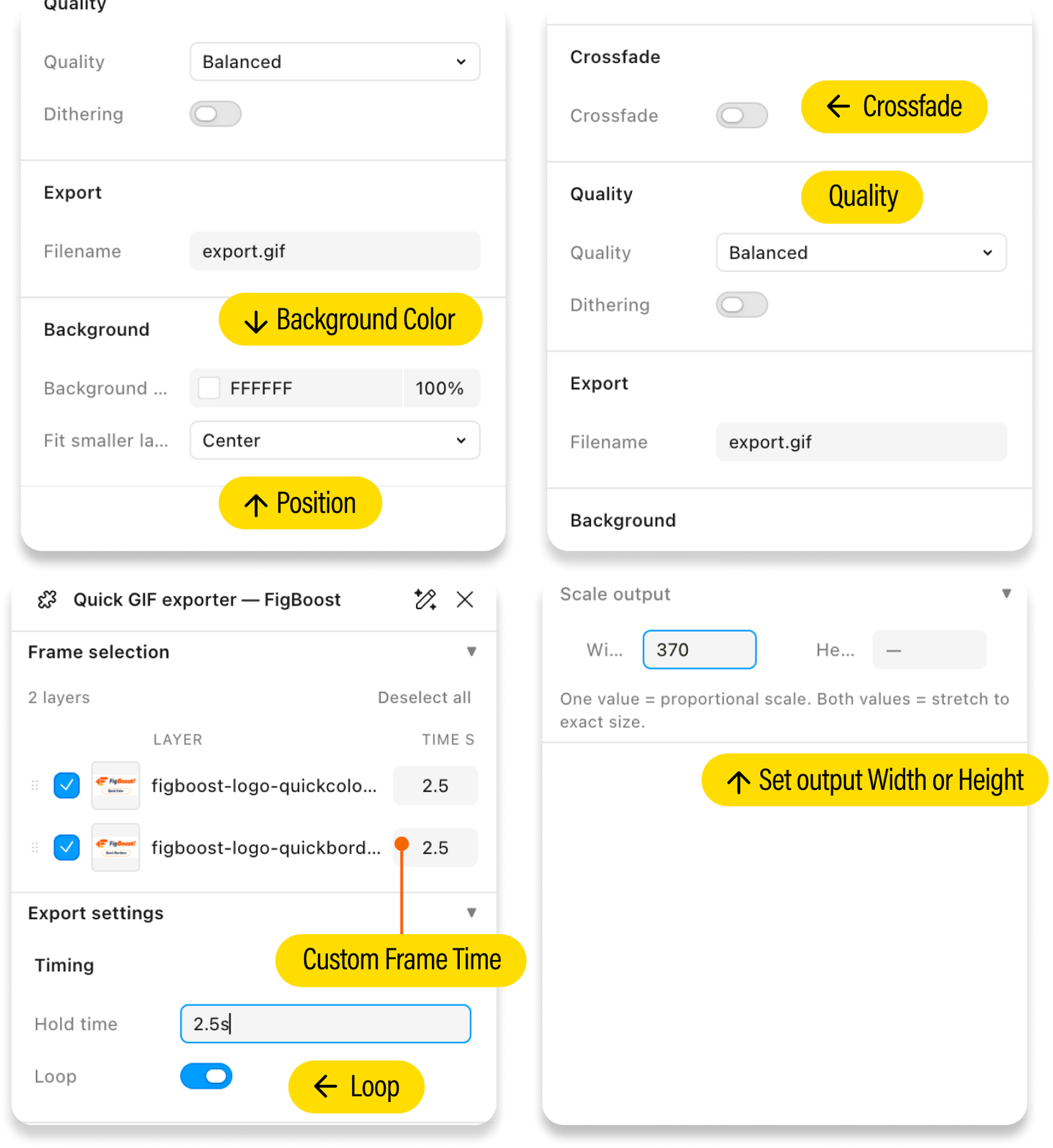
Turn any Figma frames, images, or groups into a polished animated GIF without leaving the app. Select your layers, set your timing, and download — no third-party tools, no manual stitching, no round-trips through other software.
Stats:
- Export any layer type — frames, images, and groups all work as animation frames
- Per-frame hold times — set a global duration or customize each frame individually. Title slides can hold for 3s while detail frames run at 1s — all in the same export
- Crossfade transitions — one toggle adds a smooth dissolve between every frame, with full control over fade speed
- Mixed frame sizes just work — the plugin auto-calculates a shared canvas from your largest frame and positions smaller ones using six fit modes: Center, Top, Bottom, Left, Right, or Stretch
- Scale output to any size — set a target width or height for proportional scaling, or lock both for an exact pixel dimension. Live preview shows your output size as you type
-
Quick Plugins to boost your workflow.
Focused plugins that handle color, type, shadows, borders, radius, masks, copy/paste placeholder content/type and gradients — so you spend less time configuring and more time creating.
FigBoost Gradient
Build beautiful gradients without the back-and-forth.
A focused gradient builder and editor that keeps all your controls in one place. Stop tweaking color stops one by one — create, adjust, and apply gradients in seconds.
FigBoost Radius
Perfect corners on every layer, in one click.
Set corner radius presets and apply per-corner control across your entire selection at once. What used to take dozens of manual edits now takes a single action.
FigBoost Color
Your entire color system, built in minutes.
Generate a full brand color palette complete with variables, semantic tokens, and Light/Dark mode — all wired up and ready to use. Skip hours of manual variable setup and start designing with a production-ready color system from day one.
FigBoost Border
Consistent borders across your design, without the repetition.
Define stroke and border presets once, then apply them semantically to any selection in a single step. No more hunting through properties panels or re-entering the same values on every component.
FigBoost Typography
A complete type system, fully wired, in under five minutes.
Install a variable-driven type scale with text styles, responsive Desktop and Mobile modes, and scaffolded pages — all configured automatically. Setting up typography by hand takes hours. FigBoost Typography does it before your coffee gets cold.
FigBoost Shadow
Elevation and depth, dialed in instantly.
Choose from elevation-based shadow presets or build custom shadows with precise control, then apply them consistently across your layers. Replace the tedious trial-and-error of manual shadow values with a system that just works.
FigBoost DesignKit
Your entire design system, scaffolded and ready, in under a minute.
Generate brand color ramps, semantic tokens, typography variables, spacing scales, radii, and responsive Desktop/Mobile frames — all wired together automatically. QuickDesign builds your color palette, type scale, spacing chart, and starter components, then drops them into clean scaffold pages so you can start designing immediately.
Manual setup takes hours. FigBoost QuickDesign does it before you even open your first frame.
FigBoost Images & Masks
Place images, mask into any shape, rotate, and adjust opacity — without leaving Figma.
Upload photos, pull placeholder images from Lorem Picsum, apply circle or shape masks in one click, rotate layers in place, set opacity in steps of 5%, and scale image fills without resizing the frame. Everything you reach for when working with images, condensed into a single focused panel.
FigBoost Copy/Paste Styles
Copy any style from one layer. Paste it to any selection in one click.
A focused style transfer tool that captures fills, strokes, effects, shadows, layout, spacing, radius, blend mode, opacity, and text styles — individually or all at once. Stop re-entering the same values across layers and spend that time designing.
FigBoost Type & Content
Every text property you need, one click away.
Full control over size, weight, line height, letter spacing, paragraph spacing, alignment, case, and decoration — plus a ready-to-use content library that drops Lorem ipsum, UI labels, names, contact info, and dates directly onto the canvas at 390px mobile width. What used to take five panel clicks now takes one.
Privacy Policy
FigBoost does not collect or store personal customer data. No customer data is stored, shared, or sold.
If you have any questions, contact us at:
storeboostapps@gmail.com
Testimonials
"I use these plugins every day in my workflow. The QuickExport Pro plugin cuts an hour out of my day!"
"Building a variable brand color system is a pain. Takes seconds with FigBoost Quick Color."
"I build wireframes everyday. I use Quick Wireframes. I can build an entire site in a couple hours. Amazing!"